 Anvil Tools
URL Encoder & Decoder
Encode text for a URL or decode percent-encoded values safely.
Open tool →Paste in a web address, a piece of text, or contact details, and get back a QR code that any phone camera can scan. The code is generated entirely in your browser and can be downloaded straight away as a PNG image.
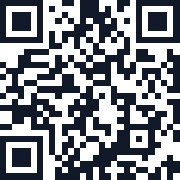
Enter the complete URL below, generate, and download the PNG. Check the exact decoded address before using it in a print layout. The generated code is 180 × 180 pixels; preserve square proportions, add a clear light margin, and test the final print size.
| Input or check | Expected result or decision |
|---|---|
| https://nevco.online/ | The decoded code should contain exactly https://nevco.online/. |
| Change the destination later | Generate a replacement code; this site provides no editable redirect service. |
Use a complete HTTPS address, download the image, and scan it with another device. Keep a clear border around the code and avoid shrinking it until the small squares merge.
Keep a clear margin and strong contrast around the code. Long input makes a denser code that may need a larger printed size.
These tools open separately; inputs are not transferred.
Encode text for a URL or decode percent-encoded values safely.
Open tool →Generate a five-color palette for design work, with the option to lock colors you like.
Open tool →Turn JPG, PNG, or WebP images into ordered pages in one downloadable PDF.
Open tool →Create a strong, random password with adjustable length and character types.
Open tool →The QR symbol is generated in your browser. The payload is not sent to an Anvil processing server.
Scan reliability depends on payload length, size, contrast, quiet zone, printing, camera, damage, and environment. Always test the final artifact and destination.
QR codes can hold a few thousand characters, but shorter input produces a simpler, easier-to-scan code. Stick to short links or messages where possible.
No. Once generated and downloaded, it's a static image that works for as long as the content it points to (like a web page) stays available.
This tool generates a standard black-and-white code for maximum scan reliability. Color and logo customization is not currently supported.
A capacity error needs a shorter message or URL. If the QR library did not load, reload with a working connection. For scanning failures, test the downloaded PNG, preserve its light border and square proportions, and check the final print size with a phone.
The generated code stores the text you supplied. To change it, generate a new code. If you encode a URL you control, you may change what that URL serves separately.
Scan the actual downloaded image at its intended printed size. Check the destination, preserve a blank margin, and avoid placing a logo or decoration over the code.
QR Codes That Scan Reliably: A Preflight Guide for Print, Screens, and Posters
Learn how to make QR codes scan reliably on flyers, posters, screens, menus and print. Check margins, sizing, contrast, placement and final output.